

2026 Economic Development CRM Buyer's Guide
How to Select a CRM for Your Economic Development Organization
If you've been asked to identify and vet software for your economic development organization, you are in the right place.
Author: Tom Wengler, Founder, Convergence, LLC
What’s New in CRM for 2026
CRM is shifting from “a database with automation” to an intelligent operating system that drafts work, recommends next steps, and connects data across all your tools.
For economic developers, that means less time on admin and more time with employers, projects, and investors.
AI and “Self‑Driving” CRM
AI is moving from assistant to operator: drafting emails, logging meetings, summarizing calls, and even triggering workflows instead of waiting for staff to click buttons.
In practice for EDOs, that can look like:
-
Auto‑summarized BRE visit notes generated from call or meeting transcripts.
-
AI‑generated follow‑up task lists after a project or prospect meeting.
-
AI‑driven suggestions for next touchpoints with at‑risk investors based on engagement signals.
When evaluating CRMs, ask:
Does the AI simply “chat,” or can it safely create and update records, tasks, and emails under clear controls?
Can I easily review, approve, or roll back what it does, with guardrails and an audit trail?
Voice and Natural‑Language CRM
Voice is becoming a normal way to interact with CRM: speaking notes into your phone, asking “show me at‑risk employers in manufacturing,” or dictating follow‑up emails from the field. For field‑oriented economic developers, this matters because BRE and project work often happens in cars, plants, and meetings—not at a desk.
When valuating CRMs, ask:
-
Can staff log visits, notes, issues, and assistance by voice from mobile?
-
Can leadership ask natural‑language questions like “Which projects over 10 million have no activity in 30 days?” and get a usable answer?
CRM and Integrations
For EDOs, this means your CRM should either INCLUDE or Integrate with...
-
Outlook, Office 365, Teams, Zoom, Gmail, Google meet, G-Suite, Office, Slack, QuickBooks, etc.
-
Websites and content management
-
Email marketing and marketing automation
-
Survey tools and BRE forms
-
Property databases
-
Incentive tracking and compliance systems
-
Workforce and talent platforms
-
Chamber or investor/membership systems
Is there a mature integration ecosystem or marketplace supported by many third‑party apps?
How hard is it to connect to my existing tools—and to future systems I have not selected yet?
Measurable Outcomes, Not Just Features
Modern CRM practice emphasizes starting with clear, measurable goals (for example, reduce admin time by 40%, increase investor renewal by 10%, improve BRE visit completion by 25%) and then using AI and automation to hit those targets. For EDOs, this means your 2026 CRM selection should include a plan to track:
-
Time saved per staff member on data entry and reporting.
-
Response times on RFIs, BRE issues, and investor/member requests.
-
Pipeline visibility for projects, expansions, and at‑risk employers.
- This guide is designed to help you choose the best system for your organization, with a focus on real outcomes rather than features alone.
How Economic Developers Use CRM
For economic developers, you need to cover all aspects of your work—and ideally, the right system lets you “work your way” while still following best practices.
Your team may need to manage some or all of the following:
| ✅ Projects | ✅ Community projects and redevelopment |
| ✅ Events | ✅ Legislation and public initiatives |
| ✅ RFIs and RFPs | ✅ Investors, membership, and capital campaigns |
| ✅ Surveys | ✅ Tourism and business attraction |
| ✅ Incentives and incentive compliance | ✅ Business incubators and accelerators |
| ✅ Property and site development | ✅ Trade missions and delegations |
| ✅ BRE visits and assistance | ✅ Startup and small‑business support |
| ✅ Grants and loans | ✅ Talent development and upskilling |
| ✅ Workforce development and talent attraction | ✅ Planning and zoning interactions |
Most modern CRM systems also allow you to attach documents to records and to create additional record types when needed. Some include Tickets (for assistance and BRE tracking) and Custom Objects (for things like properties, grants, or incentives).
It’s important to understand each object and how records relate to one another—your data model.
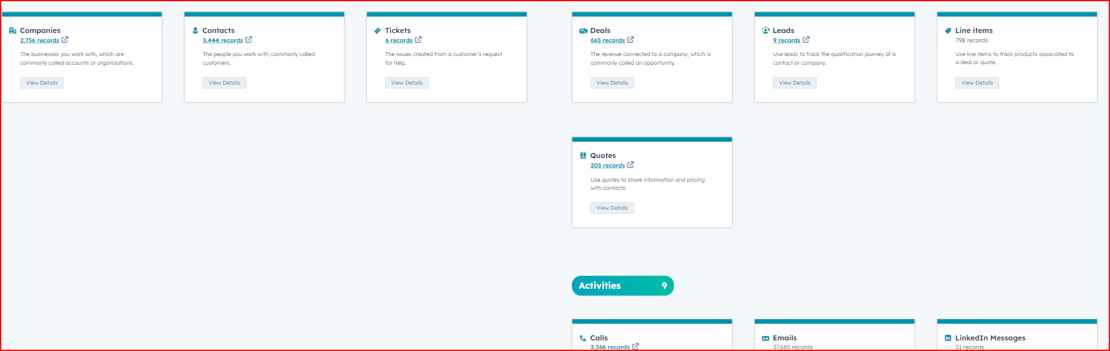
If marketing, communications, and lead generation are important to your organization, be sure to factor that into your requirements. Some CRM systems have built‑in marketing automation tools. Ideally, the CRM will connect to your website, digital marketing tools, and campaigns so you avoid a patchwork of standalone systems that may or may not talk to each other.
What Is a CRM?
CRM stands for customer relationship management. It refers to software that helps organizations track interactions with their current and future customers, employers, investors, and partners. The goal of implementing a CRM is to create a system your team can use to interact with prospects and existing relationships more efficiently and effectively—and to measure and report on those interactions.
Marketing and communications teams often use a CRM to generate and nurture leads, which is why having your marketing system connected to the CRM is so important. With the right setup, you can:
Target companies in your database with digital ads.
Target contacts by type or segment.
Send marketing emails and see who is opening, clicking, visiting your website, completing forms, and engaging in chat.
Run social media campaigns and track engagement in one place.
Use direct mail that drives recipients to landing pages you can measure.
Use online chat and chatbots as lead conversion and support tools.
Beyond projects, a CRM can help you manage talent attraction, workforce and upskilling programs, property and site development, community projects, investors and members, incentive compliance, grants, loans, and more. Anyone using the CRM doesn’t have to dig through email to remember where a conversation left off—the history is on the record.Some companies have developed CRM software specifically for economic developers. They typically do this in one of two ways:
Building a solution from scratch (custom code).
Building a solution on top of a platform (such as HubSpot, Microsoft, or Salesforce).
Invest in a CRM Platform
A CRM platform can be configured to meet the core needs of economic development organizations, and each client’s system can then be tailored to their exact requirements.
Examples: Microsoft, Salesforce, HubSpot.
These large, stable companies work through networks of certified implementation partners. For example, Convergence, LLC is a HubSpot partner focused on economic development; Salesforce and Microsoft also have specialty partners in this space.
Advantages of this model include:Widely supported, with powerful and secure back ends and world‑class data centers.
Robust online training, documentation, and user communities.
Continuous upgrades and new features delivered as part of your subscription.
Insider tips:Look closely at support plans, costs, and what is included. Some vendors charge extra for live support or limit it to larger clients.
Seek multi‑year cost lock‑ins where possible.
Look for connections to key third‑party tools (Slack, Outlook, Gmail, QuickBooks, GIS, survey tools, and so on).
Investigate online academies, certifications, and peer communities that can help your team grow skills over time.
Or Consider a Niche Software Provider
Niche providers often understand economic development workflows very well and may deliver out‑of‑the‑box EDO terminology, fields, and reports. Their advantage is domain expertise and a narrower focus.
However, there are tradeoffs to consider:
Advantages:
May offer lower license cost up front.
May include specific EDO reports and forms tailored to your type of organization.
Challenges:Little or no native marketing functionality or CMS/website tools.
Additional software (for email, surveys, project management, etc.) is usually required.
Outlook and Gmail integrations may not be as seamless or well supported as in larger platforms.
Fewer third‑party apps and integrations; most vendors do not build to these smaller systems.
Stability and long‑term viability of the company should be evaluated carefully.
Limited ability to configure or enhance the system on your own—you may need to pay the vendor for many changes.
Clean Data Is Good Data
Company and contact data is dynamic—people change jobs, companies grow or relocate, and new programs and relationships emerge over time. The longer you operate in a community, the more your universe of relationships grows and diversifies.
You need a system that helps you:
Import data easily from spreadsheets and legacy systems.
Keep records deduplicated and clean over time.
Enrich or validate data so your team trusts what they see.
Look for tools that simplify importing, deduplication, standardization (for example, industries, NAICS codes, locations), and ongoing list hygiene.Why CRM for Economic Developers?
Economic development projects are the equivalent of enterprise‑level deals—often multi‑million‑dollar investments with long‑term community impact. It’s hard to imagine a company working on deals of that magnitude without a modern CRM.
As an economic development leader, you manage details that directly affect jobs, tax base, and perception of your community. Managing those details well is essential.
Insider tips:
Look for drag‑and‑drop functionality to easily update projects as they move through your stages.
Make sure it’s easy to see all active projects in a single view.
Use views or dashboards that flag projects with no activity after a set number of days (for example, 7, 14, or 30 days, depending on your cycle).
The Value of Data and Contacts
Having a list of community contacts, site selectors, local businesses, and partners is a major asset. Great care must be taken of that data.
At its core, a CRM is not just a tool for large companies—it is essential infrastructure for economic developers.
Contacts are key. You’ll want a complete, at‑a‑glance profile of each person you work with, including:
Realtors (commercial and residential)
Site selectors
Consultants
Educators and workforce partners
Local business owners and executives
Engineering firms and service providers
Investors and members
Vendors and contractors
Media and influencers
Committees, boards, and advisory groups
You should be able to see:History of interactions (emails, calls, meetings, notes).
Social media profiles, if relevant.
Which companies, projects, grants, tickets, and programs each contact is connected to.
Not all CRM systems make it easy to associate one person with multiple entities. Be sure to see how a single contact can be associated with multiple companies, projects, and other records and how easily you can navigate those relationships.Structure: Records and Relationships
Most economic development CRM setups are built around a few core record types:
Companies
Contacts
Projects / Deals / Opportunities
Tickets (for assistance, issues, and BRE)
Additional records like Investors, Leases, Properties, Grants, Loans, Events, and Programs
Company RecordsEach company needs a profile where you can:
Categorize the company (existing industry, prospect, startup, key employer, investor).
See all associated contacts, projects, tickets, and properties.
Track key metrics such as jobs, capital investment, square footage, and programs used.
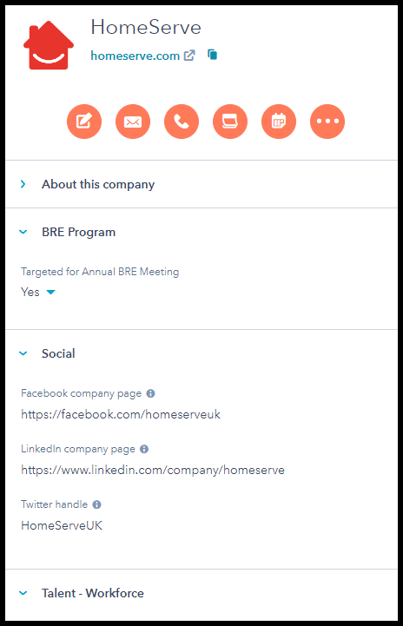
Tickets or cases are ideal for tracking “assistance provided” and BRE visits. If you offer any of the following, you may want to track the time, effort, and results:
Consulting or mentoring
Workshops and training
Assistance with loans, grants, or special programs
Responding to citizen or business owner requests
Networking and outreach efforts
Disaster relief support
Community initiatives and partnerships
Collaboration with workforce and talent partners
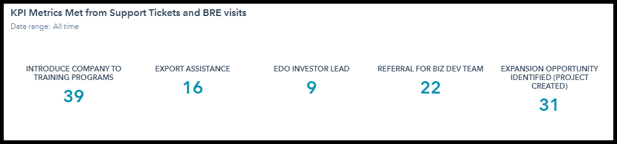
Projects / Deals
Projects are typically grouped by type and stage. You’ll want to capture:
Project type (new, expansion, retention, redevelopment, etc.).
Stage in your funnel or pipeline.
Workforce requirements and talent needs.
Desired property characteristics and site requirements.
Incentives considered, offered, and accepted.
Jobs created, jobs retained, capital investment, and other outcomes.
Incentive and project compliance milestones.
Properties and GISYou may use CRM to track properties and sites submitted as part of projects or RFI responses, as well as sites your organization owns, markets, or helps assemble. Because real estate is dynamic, GIS tools (GIS Planning, LOIS, and similar platforms) are still recommended, but your CRM should at least link to these tools and to key property records.
Activities Feed Your KPIs
Activities—emails, calls, meetings, notes, tasks—are the raw material for many of your KPIs. Reporting on activities helps you:
Show where staff is spending time.
Demonstrate proactive outreach to existing industry and prospects.
Provide continuity when a staff member changes roles or leaves.
The entire team should be able to see recent activities for any project, company, ticket, or contact in a single view.Who Should Consider CRM?
Any organization that needs to maintain relationships over time can benefit from CRM. Economic developers in particular need to track leads and “customers” across long cycles, from initial discovery through expansion and integration into the community.
Do we need a central, shared list of information on our leads, projects, and existing industry accounts?
Is this information scattered across spreadsheets, inboxes, and personal notes today?
Are our contacts and companies regularly interacting with multiple members of our team?
How does everyone keep track of where each conversation left off?
If you answered “yes” to any of these, a CRM system can likely help your organization.Benefits of CRM
There are many reasons to adopt CRM, but three big benefits for economic developers are:
Better Lead and Relationship Intelligence
See when a prospect or company is visiting your website, opening your emails, or engaging with content.
Understand which channels and campaigns are generating the right types of companies and projects.
Better Alignment Across Teams
Real‑time reporting holds everyone accountable and creates a shared view of goals and pipelines.
Customer service or BRE communications can be documented for account managers and leaders to reference.
Prioritized Activities and Closed‑Loop Reporting
Use lead or project scoring to prioritize who to call or visit first.
Connect marketing and outreach to actual outcomes (jobs, investment, renewals), so you know what is working and can adjust.
8 Must‑Have CRM Features (Plus One Bonus)
Before anything else, a CRM system has to be useful and usable for your team.
Contact Management
-
Create contact records and store relationship information with as little manual data entry as possible.
-
Look for tools that sync with Outlook or Gmail and enrich contacts automatically.
Deal / Project / Opportunity Stages
-
Customize stages to match your project pipelines (new projects, expansions, BRE issues, investors, grants, etc.).
-
Use multiple pipelines when you have different processes for different opportunity types.
-
Make sure it’s easy to move a project from one stage to the next (drag‑and‑drop is ideal).
Daily Dashboard
-
Users should have a clear view of their tasks, open projects, and key metrics.
-
Leaders should see aggregated pipelines, activity levels, and progress to goals.
Task Management
-
Avoid forcing staff to bounce between multiple tools just to see their to‑dos.
-
Look for task queues, recurring tasks, reminders, and automation that creates tasks based on activity.
Content Repository
-
Save commonly used documents (program sheets, incentive overviews, pitch decks) in one place.
-
Use email templates and snippets so staff isn’t starting from scratch with every outreach.
Automated Data Capture
-
Emails and calls should be logged automatically wherever possible.
-
Avoid systems that require excessive copying, pasting, or manual uploads just to capture activity.
Reporting and Dashboards
-
Your team should be able to build or modify key reports without a developer.
-
Make sure you can easily export or share dashboards with boards, councils, and stakeholders.
Mobile Access
-
Staff should be able to use the CRM effectively from a phone or tablet.
-
That includes logging notes by voice, scanning business cards, and seeing nearby companies while in the field.
Integration with Marketing Automation (Bonus)
-
Integrating marketing and CRM gives you a full lifecycle view of each prospect and company.
-
A gap here often leads to lost information, duplicate tools, and missed opportunities.
Conclusion
To get the full value of CRM, you need a system that fits how economic developers actually work today and that can grow with you as AI, integrations, and expectations evolve. Picking the right system, implementing it thoughtfully, and enforcing best practices will pay off in better visibility, stronger relationships, and more time spent on high‑value work.
RECOMMENDED NEXT STEP:
Define Your Requirements
Watch a Short Video - How To Define Your Economic Development CRM requirements.
Use our checklist below to see how the right system can help you and your team.

Tom Wengler, Founder & Managing Partner
TomW@Convergence-CRM.com
423.309.7483

Connect or shoot a message on LinkedIn
Or use the HubSpot meeting scheduling tool below.
(This is just one of the incredible tools our clients use to save time)